
MCP server
Enable AI applications to interact with your LUY instance using the Model Context Protocol (MCP) server.
What is MCP?
MCP is an open protocol that enables seamless integration between AI applications and external data sources. It provides a standardized way for AI agents to access LUY in a secure and consistent way by exposing so-called “tools“. The AI agent can freely use and combine those tools to solve tasks.
For more details on MCP, visit https://modelcontextprotocol.io/docs/learn/server-concepts
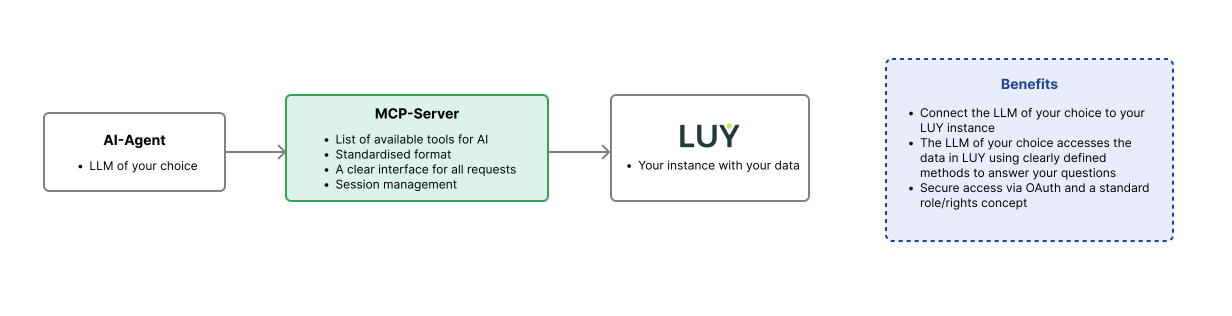
Connecting to the MCP server
To connect to LUY’s MCP server, please contact our support team for an initial setup of your IDP (identity provider, e.g. Keycloak, Entra ID).
As soon as the MCP server and the IDP are linked up, the AI agent can be configured.
Available tools
The following table lists all the tools LUY’s MCP server offers. These tools cannot be modified or customized by admins. Based on the input, the AI agent will use tools to retrieve data from LUY.
|
Tool name |
Description |
Parameters |
|---|---|---|
|
metamodel |
Retrieve the complete metamodel structure for LUY, showing all available building block types and their possible relations. Use this first to understand what types of elements exist in the system. |
None |
|
search_luy |
Search across all building blocks in LUY using natural language queries. Returns matching items with evidence snippets but without relation data. Use this for finding specific systems, processes, or components by name or description. |
|
|
query |
Query all elements of a specific building block type. Returns basic information (ID, name, description) for all items of the specified type, but excludes relationship data. Use this to get an overview of all systems, processes, or other elements of a particular type. |
|
|
get_element_by_id |
Get complete details for a specific element by ID, including all relations and metadata. This is the ONLY tool that provides data on relations. Use this when you need to analyze relations or perform detailed architecture analysis. |
|
|
building_block_history |
Retrieve element history from LUY. Get the history for all elements of a specific type, or for a specific element by ID. Supports filtering by time range and entry count. |
|
|
user_details_luy |
Retrieve information about the current user in the LUY system. |
None |
Example questions & effective prompting
-
Are there any applications (software, hardware, servers, etc.) approaching deprecation, end-of-life or other critical deadlines and what's the risk exposure?
-
Which processes have a low degree of digitization and who is responsible for them?
Dependent on the AI agent in use, best practices for, e.g., prompting remain as they are when using the LUY MCP server. This means, when creating a prompt, it might be helpful to add additional context and hints like :
-
“Don't invent or fabricate software applications that you can’t find in the system, don’t assume information you can’t find directly. Only list systems that can actually be found in LUY“.
Disclaimer
Correctness & accuracy
All reservations that normally apply when using AI, especially LLMs, also apply when using the LUY MCP server. We do not guarantee the accuracy or completeness of the results delivered by your AI agent. The MCP server merely provides the tools with which your AI agent can retrieve data from your LUY system.
Support
We only support inquiries about the MCP server itself, not the LLMs you use it with. We assist with connection setup and ensure the technical setup works.
We offer support for connecting to common LLMs: Chat GPT, Copilot, Claude. Google Gemini support will come once it is compatible with MCP.
You may use any other LLM or custom tool with our MCP server, but we cannot provide support or troubleshooting for these.
No support for content
Please note that our MCP server provides methods for your LLM to query data from your LUY system, but it cannot guarantee correct processing. LLMs tend to hallucinate and may query only part of your data, resulting in incomplete answers. This issue is beyond our support scope. Additionally, we do not support improving prompting techniques.