
2026-04 release
Display building blocks stacked on top of each other, sorted in columns and rows by using the cluster diagram.This view organizes elements into rows and columns based on their relationships and attributes, allowing you to select a building block type or attribute as a header and add a multitude of rows to visualize connected building blocks and assigned attribute values.
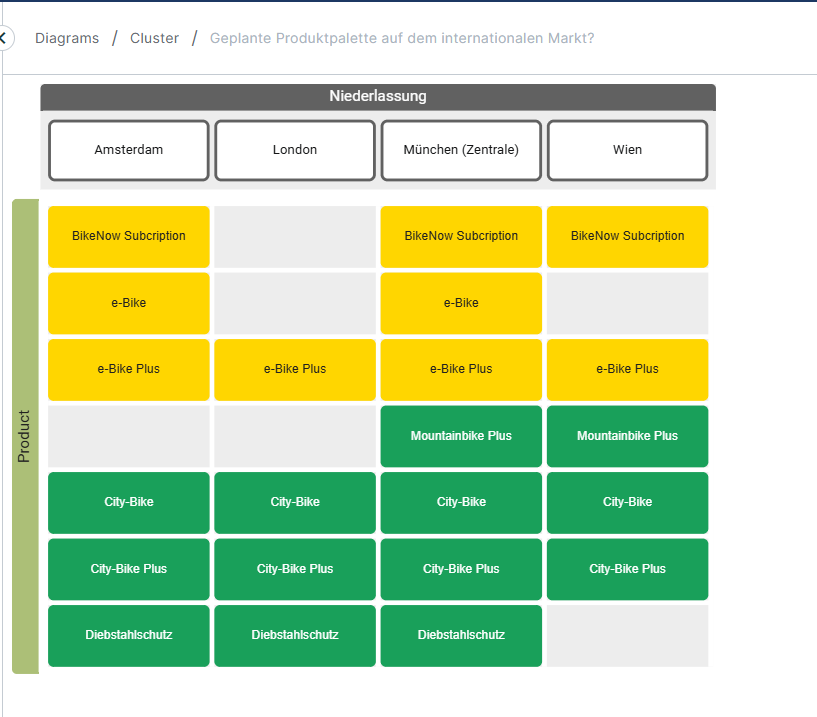
A full description of this diagram type can be found here: Cluster diagram .
In the current version, the cluster diagram is in read only mode. You are able to open and view reports but can’t edit them yet.
Open diagram
Cluster diagram reports can be opened either via the open diagram overlay or the reports page.
Open diagram overlay
The overlay shows a table of all cluster diagram reports available to you. These are either your own reports or reports which have been shared with you by other users.
In the dialogue you can see additional information like the author of the report as well as the last modified timestamp for each report.
If there is a long list of reports, use the filter option to search for specific reports by name.
There are two ways to open this overlay:
-
Click on the cluster diagram tile in diagrams.
-
When a cluster diagram report is already open, click on the cluster chart text in the breadcrumb.
All reports page
It is also possible to open a cluster diagram report via the reports page: Simply click on the name of the report to open it.
Tipp: The reports page allows you to filter not only by name but also by every other attribute of a report. E.g., it is possible to only show cluster diagram reports by filtering for “cluster” or only show reports with certain tags by filtering for the tag name.
Navigate diagram
By clicking and holding your left mouse button you can move the diagram content.
Clicking CTRL while scrolling will zoom in and zoom out.
Limitations
Be aware that for this first iteration our new frontend does not yet support every feature known to you in our previous LUY solution. These features will follow shortly.
-
It’s not possible to edit a cluster diagram
-
Dark mode and high contrast mode isn’t supported completely
-
Some filters configurations aren’t supported yet (e.g., filters for the version attribute)