
June 2026
With this release, we are making data maintenance in LUY more focused, structured, and efficient. Pilot customers will get early access to Assignments, a new feature designed to support structured update workflows, clearer responsibilities, and more reliable data quality. Assignments are currently available in an early pilot stage and will be rolled out to all cloud customers in an upcoming release.
For all cloud customers, this release also introduces a faster way to create information flows directly from the table view, helping users maintain data more efficiently without switching contexts. In addition, we included several bug fixes to improve the overall stability and reliability of LUY.
1. New features
1.1 Assignments for structured data update workflows - available for pilot customers
We introduce Assignments, a new feature that helps organizations keep their data up to date by allowing users to request and track data updates from responsible users directly within LUY. Assignments automatically determine assignees based on configured responsibility attributes and provide full transparency into who is responsible for updating each element.
The feature includes a guided five-step assignment creation workflow with automatic draft saving, permission previews, configurable reminder preparation, and an integrated completion workflow directly in the table view. This enables teams to coordinate data maintenance more efficiently and ensures accountability across large data sets.
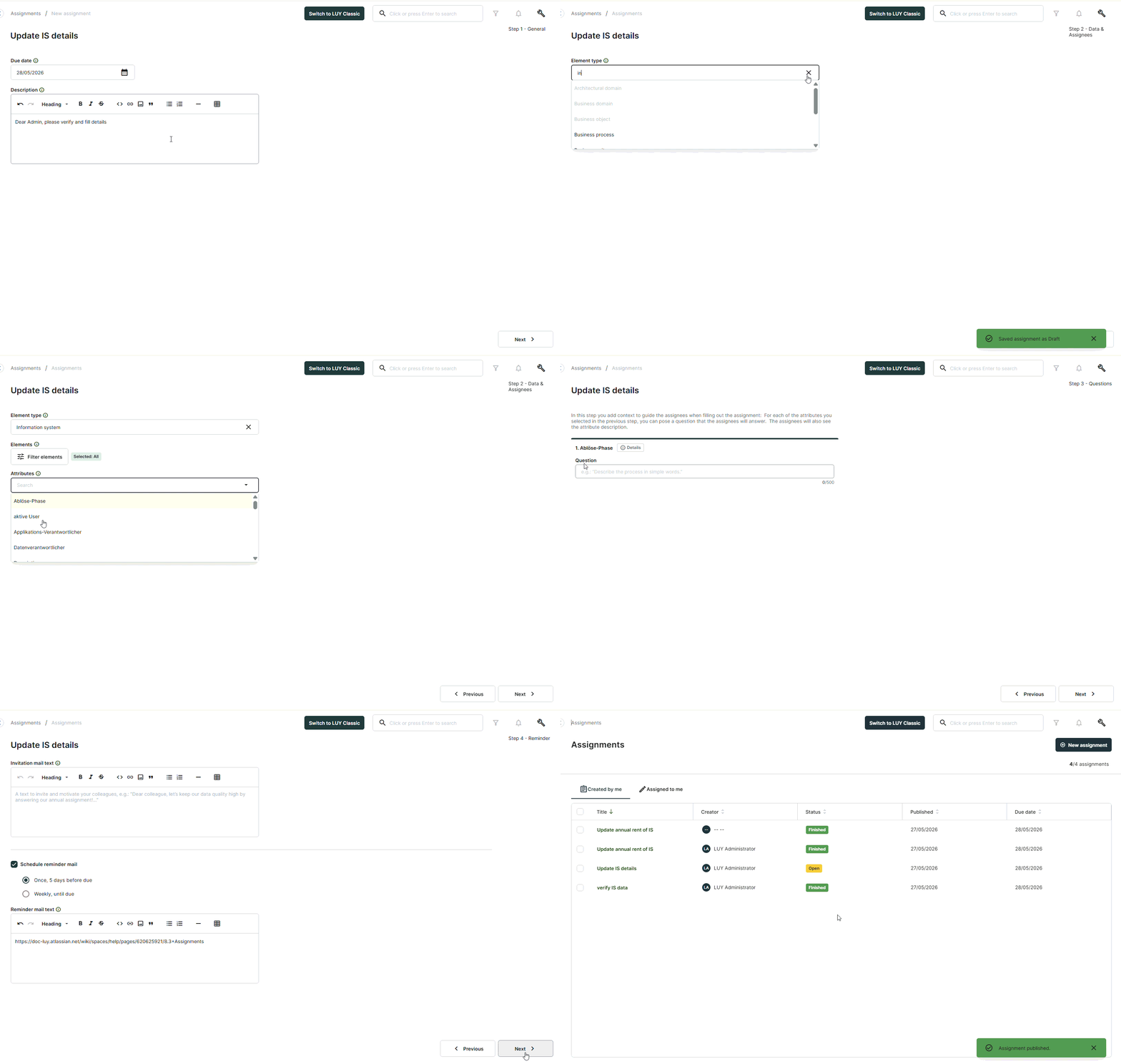
See our Assignments page in the help center to learn about the assignments workflow Assignments
1.2 Create information flows directly from table view
Users can now create new information flow elements directly within the table view, making it faster to close gaps in their data without switching contexts. The “New element” button opens a dialog with fields for name, description, and the information flow diagram, using the same familiar behavior as in the single element view. The diagram is pre-filled with default values, allowing users to quickly add information flow element and complete the creation process efficiently.
2. Improvements
-
Improved tag editing experience in table view by updating the hint text for inline editing, making it clearer and more intuitive for users.
-
Added alphanumerical sorting for name and type columns in global search results, enabling faster and more precise navigation through large result sets.
3. Bug fixes
-
Fixed an issue where business mapping tooltips displayed raw HTML instead of a proper link or readable text.
-
Fixed an issue where the /saml/metadata endpoint returned a 401 error instead of providing the metadata file.
-
Fixed an issue preventing deletion of users who had a personal dashboard assigned.
-
Fixed an issue where diagrams showed inaccessible reports in overlays despite missing permissions.
-
Fixed an issue where an error message appeared when reordering report columns, even though the change was applied.
-
Fixed an issue where deleting a relation in a table-in-table left an empty row behind.
4. Limitations
-
Assignments are currently available only to pilot customers.
-
General availability for all cloud customers is planned for an upcoming release.